
|
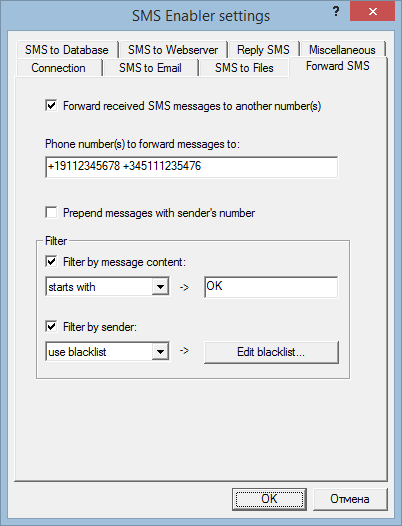
Home » Documentation » Forward Incoming SMS to Other Phones Forward Incoming SMS to Other Phones SMS Enabler can automatically forward received SMS messages to one or more other phone numbers. You can also define which messages should be forwarded and which not, based on the message content and/or sender's number. To enable auto-forwarding, open the Settings dialog box in SMS Enabler and select the Forward SMS tab page. Check the Forward received SMS messages to another number(s). Specify one or more phone numbers to which incoming messages are to be forwarded (separate multiple numbers with spaces). Specify filtering options if needed. To filter by senders' numbers, you must create either a whitelist or blacklist of senders' numbers. To filter by message content you must specify a filter citeria for a message content. Only messages that satisfy the filter conditions will be forwarded to the specified numbers. If you choose to use a regular expression to filter by message content, you should use the Perl regular expression syntax.
|
| Copyright © 2006-2023 Alexander Smirnov. All rights reserved. |